
You’re ready to take a pull. The pod’s loaded, the lights look fine, but nothing hits. The vapor’s gone. The session’s ruined.
Don’t panic, this happens more often than you’d think, even with reliable devices like the PlugPlay battery. Whether it’s residue buildup, a dead battery, or a pod not seating right, there’s usually a simple fix before you toss it in frustration.
At Big Mo’s Smoke Shop, we’ve helped hundreds of customers troubleshoot their PlugPlay setups, and in most cases, it’s fixable in under five minutes.
TLDR: Quick Fixes for a PlugPlay Battery That’s Not Hitting
- Charge it — Your battery might just be drained.
- Clean it — Oil residue can block the metal contact points.
- Reseat the pod — Remove and reinsert it gently.
- Check airflow — Clogs can kill your draw.
- Try another pod — If it lights up with another, your pod’s the issue.
1. Check the Obvious: Is the Battery Charged?
The Light Test
Start simple. Plug in your PlugPlay battery. You should see a small light indicator when it’s charging. If nothing happens, try another cable or wall adapter. We’ve had customers bring in “broken” PlugPlay batteries that turned out to be fine; their USB-C cord was the real problem.
If your device hasn’t been used in a while, it might be fully discharged. Let it sit plugged in for 30–60 minutes before testing again.
Don’t Overlook Power Sources
Some older wall adapters don’t deliver enough power for modern vape batteries. Try a laptop USB port or a high-speed charger. You’d be surprised how often that makes the difference.
2. Clean the Connection Points
Oil and Dust Build-Up Happens
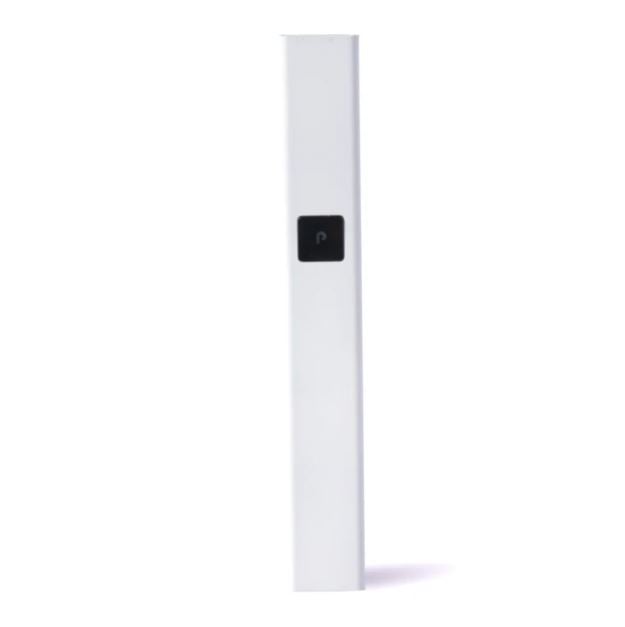
Every PlugPlay pod connects via small metal contacts on the battery. Over time, oils from extracts can build up on those points, interrupting the connection. Even a thin film is enough to block the current.
The Right Way to Clean
Take a cotton swab and dip it lightly in 90% or higher isopropyl alcohol. Clean both the contacts on the battery and the bottom of the pod. Let it dry for a minute or two before reinserting.
One of our customers came in frustrated because his battery “stopped hitting out of nowhere.” We cleaned the contact pins, and it hit perfectly again. The entire fix took less than 90 seconds.
3. Reseat or Rotate the Pod
Why Pod Alignment Matters
The PlugPlay pod slides into the battery magnetically. Sometimes, a slight misalignment keeps it from making a solid connection. Remove the pod and reinsert it with a gentle twist. You should feel a satisfying click when it connects properly.
Test With Another Pod
If the light still doesn’t come on, try inserting a different PlugPlay pod. If it fires up, your old pod’s connector might be damaged or clogged. Pods can fail occasionally, especially if oil leaks near the contact point.
4. Check the Airflow, It Might Be Clogged
The Silent Killer of Vapor Flow
If your battery lights up but you’re not getting a hit, airflow is the next thing to check. Pocket lint, oil residue, or even debris from grinding herbs can block the vent holes.
Easy Ways to Clear It
Blow gently into the mouthpiece to loosen up any debris. You can also use a thin pin or straightened paperclip to clear the side air channels, but do it carefully, as too much pressure can damage the pod.
We had one customer who thought his PlugPlay battery was defective. Turned out, a single piece of lint from his hoodie pocket was blocking the intake.
5. Battery Lock or Reset Issues
Some PlugPlay devices can lock or go into safety mode after extended inactivity. Try pressing the power button multiple times in quick succession; three to five clicks should unlock it.
If your model doesn’t have a button, skip this step and move to the next fix.
6. Perform a “Soft Tap” or Full Reset
Light Tap Reset
Sometimes the internal connection gets slightly offset after being dropped. Hold your PlugPlay firmly and tap the bottom lightly against your palm. This can help realign the internal contacts.
The Overnight Charge
If it’s been completely dead for a while, plug it in overnight. Long disuse can sometimes cause the protection circuit to shut off entirely, and a full charge cycle can “wake it up.”
7. When It’s Time for a Replacement
Even durable devices have limits. If your PlugPlay battery doesn’t respond after trying multiple pods, cleaning, and charging, it might be time for a new one.
The good news? You can find genuine PlugPlay batteries right here at Big Mo’s Smoke Shop. Avoid knockoffs; fake batteries often cause connection problems, poor lifespan, or overheating.
We’ve seen customers switch from counterfeit to authentic PlugPlay devices and immediately notice smoother hits, better battery performance, and fewer issues connecting pods.
Pro Tips from Big Mo’s
Keep It Upright
Store your PlugPlay upright to prevent oil from leaking into the pod connection area.
Wipe After Each Session
A quick clean with a tissue or alcohol wipe every few days keeps residue from building up.
Don’t Chain Vape
Allow a few seconds between pulls. Overheating the coil can cause clogs or trigger thermal protection mode.
Final Thoughts
A PlugPlay battery that isn’t hitting can feel like the end of your session, but in most cases, it’s just a quick fix away.
Start with the basics: charge it, clean it, and reseat the pod. Nine times out of ten, that’s all it takes.
At Big Mo’s Smoke Shop, we’ve helped customers troubleshoot thousands of PlugPlay devices. Whether you need a replacement battery, new pod flavors, or cleaning supplies, we’ve got your setup covered.
And if you’re tired of your battery giving you trouble altogether? It might just be time for an upgrade; your next session deserves it.
-

 $29.99Select options This product has multiple variants. The options may be chosen on the product page30 point item
 -
$29.99 – $34.99Price range: $29.99 through $34.99Get notified This product has multiple variants. The options may be chosen on the product page30-35 point item


