

The UT Bar 50K is not your typical disposable. It has two flavor tanks, two performance modes, adjustable airflow, and a full-color display showing everything happening inside the device. That is a lot of controls for a product that most people pick up expecting to just inhale and go.
We carry the UT Bar 50K at Big Mo’s and get questions about it regularly. People want to know what the different settings actually do, what the display is telling them, and what the light colors mean when something changes. This guide covers all of it.
Once you understand how the device works, using it becomes second nature. The learning curve is short. The payoff is a vaping experience you can actually customize.
TLDR:
- The UT Bar has two modes: Eco (up to 50,000 puffs) and Turbo (up to 25,000 puffs)
- Airflow has three click positions: Turbo (open), Eco (balanced), and Off (tight)
- Two buttons let you control how much of each flavor tank fires per puff
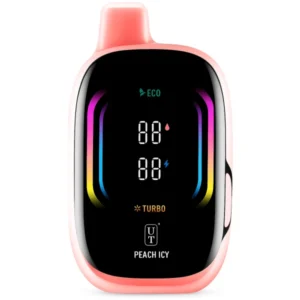
- The full-color display shows battery, e-liquid levels for both tanks, flavor ratio, and current mode
- E-liquid indicator color changes from white to orange to red as tanks deplete
- The red indicator means the tank is nearly empty
- Battery bars dim and blink when the charge is critically low
What Makes the UT Bar Different
Most disposable vapes give you one flavor, one puff strength, and no information about what is happening inside the device. The UT Bar 50K is built differently. It has two separate e-liquid tanks, each with its own coil, and you control how much each tank contributes per puff.
The result is a device you can tune. Vape a single flavor straight, blend both equally, or lean toward one side. Switch output modes based on how you want to use it that day. Eco mode stretches the puff count. Turbo mode raises output for bigger vapor and stronger flavor. Add adjustable airflow and a live display, and you have a disposable that behaves more like a configurable device than a single-use item.
The Two Performance Modes
Eco Mode
Puff count: Up to 50,000 puffs
Eco mode runs the coils at a lower output. Smaller clouds, lighter flavor intensity, and a much longer total puff count. This is the ideal mode for all-day use or when you want the device to last. The draw is smooth and consistent. Think of Eco as the default. Most users stay here for regular sessions.
Turbo Mode
Puff count: Up to 25,000 puffs
Turbo mode pushes more power through the dual mesh coils. Flavor hits harder. Vapor is denser. You feel more from each puff. The tradeoff is lifespan. Turbo roughly cuts your puff count in half compared to Eco.
Use Turbo when you want the full flavor hit, when you are sampling a new flavor combination for the first time, or during evening sessions when you prefer a stronger experience.
Mode Comparison
Eco Mode | Turbo Mode | |
Puff Count | Up to 50,000 | Up to 25,000 |
Coil Output | Lower | Higher |
Vapor Production | Moderate, smooth | Dense and full |
Flavor Intensity | Consistent, mild | Stronger hit per puff |
Best For | All-day use, longer device life | Flavor sessions, heavier vaping |
Airflow Settings
The UT Bar has a clickable airflow control with three distinct positions. Moving through them changes draw resistance in a way you can feel immediately.
Position | Draw Style | Best For |
Turbo | Wide open, direct-to-lung | Big clouds, maximum vapor volume |
Eco | Moderate, balanced | Most users, everyday vaping |
Off | Tight, restrictive MTL-style | Concentrated flavor, discreet puffing |
The airflow setting and performance mode are independent controls. You can run Turbo mode with tight airflow or Eco mode wide open. Mixing these settings is how you get the 12 possible combinations the UT Bar is built around. Experimenting takes a few minutes and is worth doing.
The Flavor Control Buttons
Two buttons on the device independently control each flavor tank’s output level. The left button adjusts the primary tank. The right button adjusts the secondary tank.
You can run both tanks at full for a true blend, drop one tank to zero for a straight single flavor, or weight one side heavier than the other. The display shows the current ratio live, so you always know what you are set to. The device ships with both tanks set to equal output. Adjust from there based on your taste preference.
What the Display Shows
Display Element | What It Tells You |
Battery Level | Bar indicator showing remaining charge. Bars decrease as the battery drains. |
Primary Tank Level | E-liquid remaining in the primary flavor tank |
Secondary Tank Level | E-liquid remaining in the secondary flavor tank |
Current Mode | Shows whether the device is running Eco or Turbo |
Flavor Ratio | Current output balance between the two flavor tanks |
You can see everything at once without pressing anything. Both tanks, the battery, your current mode, and your current ratio are all visible on a single screen in real time.
Light and Indicator Meanings
E-Liquid Level Indicator Colors
Color | Meaning | Action Needed |
White | Tank is full or has plenty of e-liquid | None |
Orange | Tank is getting low, roughly halfway depleted | Start thinking about your next flavor |
Red | Tank is nearly empty | Time to pick up a new UT Bar |
Each tank has its own indicator, so it is possible for one to go red while the other is still orange or white. When that happens, adjust your flavor ratio to draw more from the fuller tank.
Battery Indicator
Battery level shows as a bar indicator on the display. A full battery shows all bars. As you use the device, bars drop. When critically low, the indicator blinks. Plug in via USB-C. The device works while charging, and the display shows progress in real time.
Troubleshooting Common Issues
Device Not Hitting
Check the battery. A dead battery is the most common reason a disposable stops firing. If the display shows low or no bars, charge it before anything else.
Check the airflow. If the dial is set in the Off position, the draw will feel completely blocked. Slide it to Eco or Turbo.
Check the tank indicators. If both show red, the device is empty. Charging will not bring flavor back from a depleted tank.
Weak Hits or Thin Vapor
Switch to Turbo mode. Eco mode has intentionally lower output. If the draw feels too light, Turbo will fix that.
Open the airflow. A tight airflow restricts vapor volume. Move the dial toward the Turbo airflow position.
Check your flavor ratio. If one tank is nearly empty, shift the ratio toward the fuller tank.
Flavor Tastes Off or Muted
Pace your draws. Chain vaping heats the coils and mutes flavor. A few seconds between puffs keeps the coils at optimal temperature.
Shorten your draw length. Very long draws overheat the coil and produce a warmer, less accurate flavor. Medium-length draws perform best.
Adjust the ratio. If one flavor is overpowering the other, dial back the dominant tank with its button.
Draw Style and Setting Guide
Goal | Airflow | Mode | Result |
All-day vaping | Eco | Eco | 50K puffs, smooth, consistent draw |
Flavor sessions | Eco | Turbo | Stronger output, clear flavor on balanced airflow |
Big clouds | Turbo | Turbo | Dense DTL vapor, full flavor hit |
Discreet use | Off | Eco | Tight MTL draw, concentrated flavor, minimal vapor |
Frequently Asked Questions
How do I switch between Eco and Turbo mode?
The mode toggle is built into the button controls on the device. The current mode shows on the display at all times, so you always know which one is active.
Can I use both flavors at the same time?
Yes. Both tanks fire simultaneously in a ratio you set. Equal output gives you a 50/50 blend. Favor one button over the other to shift the balance toward your preferred flavor.
What does it mean when the indicator turns red?
Red means that the specific tank is nearly empty. If only one tank is red, the other still has e-liquid. Shift your ratio to draw more from the full tank. If both are red, the device is done.
How many puffs does it actually last?
In Eco mode, up to 50,000. In Turbo, closer to 25,000. Your actual count depends on draw length and frequency. Short, consistent draws get you closer to the rated maximum.
Is the UT Bar rechargeable?
Yes. USB-C charging. The device can be used while plugged in. The display shows charging progress live.
Does the airflow setting affect puff count?
Airflow affects draw style and vapor volume, but not puff count directly. Puff count is determined by the performance mode and how much e-liquid each draw consumes. Longer draws consume more per puff regardless of airflow.
Final Thoughts
The UT Bar 50K has more going on than most disposables, but none of it is complicated once you know what each setting does. Eco and Turbo control power and puff life. Airflow controls draw resistance. Two buttons control your flavor blend. The display and color indicators tell you the status of both tanks and the battery at a glance.
Spend a few minutes with the controls, and they become intuitive fast. The payoff is a device you can actually tune rather than just accept as-is. That is a meaningful difference in the disposable market, and a big part of why the UT Bar stays one of our best sellers at Big Mo’s Online Smoke Shop.
-

 Rated 4.91 out of 5$19.99Select options This product has multiple variants. The options may be chosen on the product page20 point item
-

 Rated 4.94 out of 5$21.99Select options This product has multiple variants. The options may be chosen on the product page22 point item
-

 Rated 4.99 out of 5$19.99Select options This product has multiple variants. The options may be chosen on the product page20 point item
-
Rated 5.00 out of 5
$27.99Original price was: $27.99.$19.99Current price is: $19.99.Select options This product has multiple variants. The options may be chosen on the product page20 point item


