
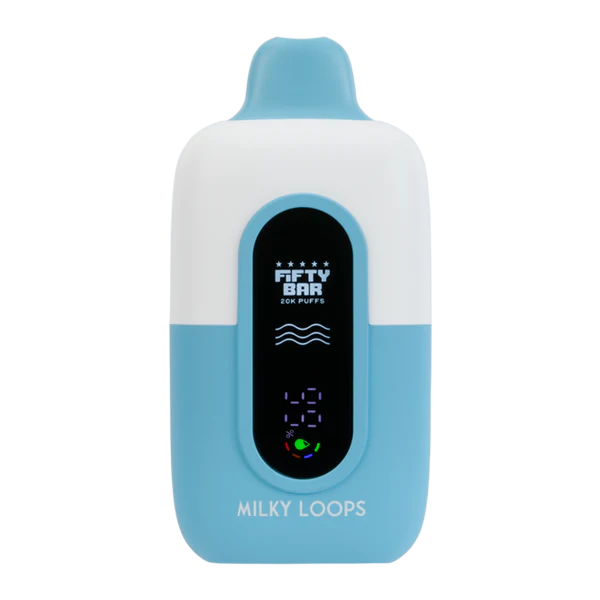
Pick up a Fifty Bar and the small screen on the front looks straightforward at first glance. Then a battery icon starts blinking, the LED ring shifts to a different color mid-session, and suddenly it is not so obvious what any of it means.
The Fifty Bar is a fixed-output device built around 5% salt nicotine and roughly 6,200 puffs per unit, so it does not have wattage dials or temperature settings to fuss with. What it does have is a screen, an LED indicator, and an adjustable airflow ring, and each one is telling you something useful if you know how to read it.
Our guide walks through every icon, every color, and every airflow position so nothing about your Fifty Bar feels like a mystery:
TLDR:
- The Fifty Bar has a fixed output. You cannot adjust wattage or temperature, only draw style and airflow.
- The screen shows battery level and remaining e-liquid through simple icons, not exact numbers.
- LED colors mostly track battery status, with a distinct color reserved for low battery or low e-liquid warnings.
- The airflow ring adjusts how tight or loose the draw feels, which changes flavor intensity and vapor volume.
- A flashing LED combined with no vapor almost always means low e-liquid or a battery in need of a charge.
- Cleaning the airflow slots and mouthpiece regularly prevents most of the odd behavior people mistake for a defect.
What the Fifty Bar Can and Cannot Adjust
This is a fixed-output disposable, which means the coil always fires at the same output level no matter what. There is no button to change wattage and no menu to dig through. The two things you actually control are draw style, meaning how hard and how long you pull, and the airflow ring, which changes how much air mixes with the vapor on the way in.
Reading the Screen Icons
Battery icon
A battery-shaped icon on the screen fills or drains to show roughly how much charge remains. It is a general indicator rather than a precise percentage, so treat a mostly-full icon as plenty of charge left and a nearly-empty one as a signal to charge soon.
E-liquid level icon
A separate icon, usually shaped like a droplet or a small tank outline, shows approximately how much e-liquid is left. Like the battery icon, it is meant as a rough guide rather than an exact measurement.
Puff counter, where available
Some Fifty Bar screens include a running puff count. This is the most literal number on the display and the most useful one if you like tracking how close you are to the device’s rated puff life.
What Each LED Color Means
LED Color | What It Means | What to Do |
|---|---|---|
Steady white or blue (varies by batch) | Normal operation, battery in good shape | Nothing, keep using as normal |
Dim or fading light during a draw | Battery getting low | Plan to charge within the next several draws |
Flashing fast on a draw | Low battery or low e-liquid warning | Check the screen icons to see which one is triggering it |
No light at all when drawing | Dead battery or empty e-liquid | Charge the device before assuming it is finished |
Flashing during charging | Actively charging | Leave it connected until the light turns solid or off |
Airflow Settings Explained
The airflow ring sits near the base or mouthpiece, depending on the version, and rotates or slides between open and closed positions. It does not change the output level, but it changes almost everything about how the vapor feels.
Airflow Position | Draw Feel | Best For |
|---|---|---|
Fully closed | Tight, cigarette-like draw | Mouth-to-lung style, stronger throat hit |
Half open | Balanced draw, moderate airflow | Most all-day users, a middle ground |
Fully open | Loose, airy draw with more vapor | Bigger clouds and a cooler-feeling hit |
Troubleshooting
Screen stays blank
A blank screen almost always means the battery needs a charge. Plug it in and give it a few minutes before assuming the display itself has failed.
LED flashes but no vapor comes through
Check the e-liquid icon before anything else. A flashing light paired with no vapor usually points to an empty tank rather than a battery or coil problem.
Airflow ring feels stuck
Do not force it. A stuck ring is usually caused by residue buildup around the slots. Wipe the area gently with a dry cloth or cotton swab and try again.
Draw feels weaker than it used to
Check the airflow position first, then the e-liquid level. A weaker draw is often just an airflow ring that has shifted, not a sign the device is failing.
FAQ
Can I change the wattage on a Fifty Bar?
No. It is a fixed-output device, so wattage and temperature are not adjustable. Draw style and airflow are the only variables you control.
What does a flashing LED mean on a Fifty Bar?
It generally signals low battery or low e-liquid. Check the screen icons to narrow down which one is triggering the warning.
Why did the LED color change during my session?
Color and brightness shifts usually track battery level. A dimmer or differently colored light as a session goes on is normal, not a malfunction.
Does closing the airflow make the device stronger?
It changes the feel of the draw more than the strength. A closed airflow gives a tighter, more cigarette-like hit, while an open airflow feels smoother with more vapor.
How many puffs does a Fifty Bar actually last?
Fifty Bar devices are built around roughly 6,200 puffs per unit, though actual puff count varies with draw length and airflow setting.
Can I clean the airflow ring myself?
Yes. A dry cloth or cotton swab around the airflow slots is usually enough to clear buildup and restore smooth adjustment.
Final Thoughts
None of the screen icons, LED colors, or airflow positions on a Fifty Bar are meant to be complicated. Once you know that the screen tracks battery and e-liquid, the LED mostly reflects battery health, and the airflow ring shapes draw feel rather than output, the whole device becomes easy to read at a glance.
A few minutes learning these signals now saves the guesswork later, especially the moment a light starts flashing mid-session.
-

 Rated 4.83 out of 5$19.99Select options This product has multiple variants. The options may be chosen on the product page20 point item
